Windows 10 now provides pinning a settings icon in Start screen
Did you install the latest version of Windows 10 Technical Preview? Microsoft added “Pin to Start” option to the Settings page icons, by whi...
-
Published by Kunal Chowdhury

Did you install the latest version of Windows 10 Technical Preview? Microsoft added “Pin to Start” option to the Settings page icons, by which we will be able to pin any settings page in the Start Screen. So, from now onwards you will be able to pin your favorite settings icon for easy access.
In this post, let’s briefly describe the feature introduced in Windows 10 Technical Preview. Be ready for the Windows 10 launch on 29th July.
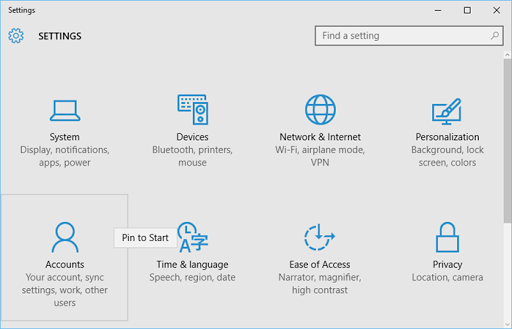
The settings page can be invoked from the Start Screen –> Hamburger icon –> Settings. This can also be easily launched by just pressing “Win + I” shortcut keys together. In the settings page, you can now right click on the individual item and pin them to the start screen by clicking the small one liner context menu titled “Pin to Start”, as shown below:
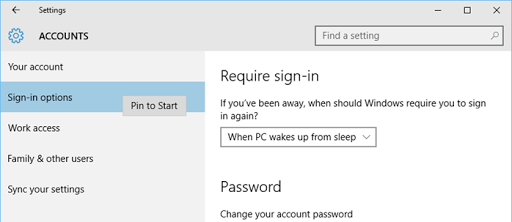
Not only that. You can pin any sub items too in the start screen, as shown in the below screenshot:
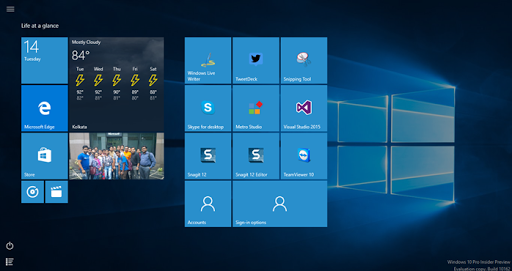
And rest is yours… now all your favorite settings icons are in the Start Screen for your easy access. Not only this, you can resize and get the live tile notifications (wherever available).
Liked the post? Don’t forget to read other articles on Windows 10 series that I published here in my blog: win10tips.kunal-chowdhury.com. Don’t forget to subscribe to my blog’s RSS Feed and Email Newsletter to get the updates delivered to your inbox. I am available on Twitter, Facebook and Google+. Connect with me and subscribe to my feeds to get all the updates that I share.