With the Google Chrome version 84, the search giant introduced the secure DNS in May 2020, and now Microsoft is bringing this feature to it's Edge browser and making the web browsing with Microsoft Edge more secure and private for its users.
If you are having the latest Microsoft Edge Canary build installed on your system, you can immediately try out this feature by selecting one of the four custom DNS service providers added in the browser settings. Let's learn how to secure your browsing with DNS over HTTPS (DoH).
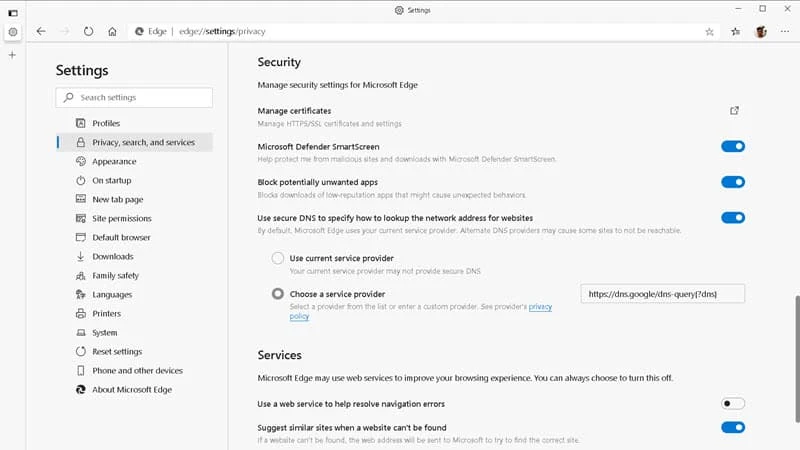
Just like the latest versions of Google Chrome, Microsoft Edge is also going to have secure DNS of HTTPS (DoH) and that will be enabled by default to make your browsing more secure and private.
Microsoft Edge is also going to have four custom DNS providers which include Quad9 (9.9.9.9), CleanBrowsing (Family Filter), Google (Public DNS), and Cloudflare (1.1.1.1). You can select anyone from that list or continue using your current service provider.
Point to note that, your current service provider may not provide secure DNS.
To check whether the secure DNS has been enabled for you, and to select which service provider you want to use, open your Microsoft Edge browser and navigate to Settings | Privacy, search, and services.
Scroll down to the Security section, as shown in the following screenshot, and check whether the "Use secure DNS to specify how to lookup the network address for websites" option is enabled or not.

From here, you can either select your current service provider or one of the custom service providers available on the list.


