OP Auto Clicker is a full-fledged auto clicker with two modes of auto-clicking, at your dynamic cursor location or at a prespecified location. The maximum amounts of clicked can also be set (or left as infinite). Are you looking for the easiest way to install OP Auto clicker 3.0, we have got your back just in case.
Today, in this article we will learn about OP auto clicker 3.0. What is this? How is it different from others? And how can you install it on your PC without any hassle?
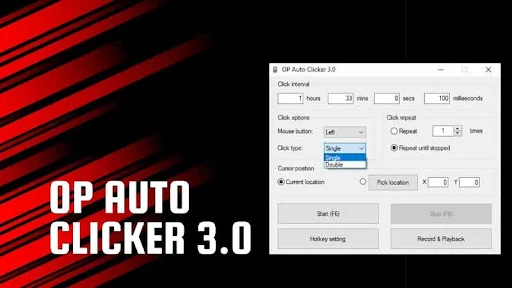
OP auto clicker 3.0: In a Nutshell
OP Auto Clicker's primary role is to imitate mouse clicks on a PC. It can click indefinitely until you disable it, or you can set a number of clicks and a timer between each click. You may sit back and relax after running this program since you will no longer need to utilize your mouse or keyboard.
There are two mechanisms. You can define a dynamic place for the cursor to click in the first mode. In the second option, you can point the auto clicker to a specific spot before executing it.
It is usually used by gamers for clicking games such as cookie clicker, realm grinder, clicker heroes, and so on. This auto clicker is available exclusively for Windows. This auto clicker can be downloaded from the official website. Moreover, it is free without any hidden costs or annoying ads. This is open-source software that ensures the data privacy and security of the user.
Downloading the OP Auto Clicker 3.0
Here is a simple step by step installation guide to install OP Auto Clicker 3.0:
- Visit the official website here - opautoclicker.co
- You will see a blue-colored download button.
- After downloading, just simply open the file and click on Run.
Finally, you got your OP auto clicker 3.0 installed on your PC. Now, you can use it in numerous ways and give rest to your mouse and keyboard.
Although many of the users nowadays are already familiar with auto clickers, in case you are having difficulty in understanding the functional terms under it, we have provided the basic manual for features below in this article.
Exploring the OP Auto Clicker 3.0
This auto clicker comes with a variety of features and functions. If you are new to this world you might face some difficulties setting it up but don’t worry we got your back.
Here, we are going to explain the features of the OP auto clicker one by one which will really make your configuration merely a cakewalk.
- After downloading, click on the app icon and open the auto clicker.
- A Screen with lots of features will appear.
- Click interval- This option will help you in setting the frequency of clicks, the lesser the time is, the higher the clicking frequency will be. Gamers generally set it in milliseconds for the desired output.
- Click options- Allows you to set the left or right-click of the mouse.
- Click type- Enables you with the single, double, or triple type of click.
- Click repeat- You can set the number of clicks that are required for your purpose. You can set any ‘n’ number of clicks or just select Repeat until stopped for an indefinite number of clicks.
- Cursor position- Set the cursor where you want your clicker to work or just click on the current location.
- You can also set any hotkey by clicking on the Hotkey setting icon, to start or stop the auto clicker instantly.
Now, you have learned what each feature does in the OP Auto Clicker 3.0. Use it according to your needs whether in any program or gaming.
Should you go for it?
The OP Auto clicker is a fantastic automation application that allows you to automate repetitive mouse clicks. I would suggest the OP Auto clicker since it's completely secure, simple to use, and packed with useful features. Moreover, it is a completely free tool with almost all the basic to some advanced level features.
This tool is quite beneficial in personalizing mouse clicks and getting a better and more precise click rate. It is a full-featured auto clicker that will help you and even improve your gaming experience. It is one of the most popular auto clickers among gamers. Due to its fluid interface and lightweight size, it is a robust auto clicker.

