Microsoft recently previewed Windows 11 Build 22557 to the insiders in the Dev Channel. The latest build brings a redesigned Task Manager with support to Dark Theme, and a new Efficiency Mode to make your running apps process faster in the foreground with efficiently utilizing energy.
The latest Windows 11 build 22557 also adds 5 new touch gestures to make it easier and quicker to navigate Windows 11 on a PC with touch. Would you like to know about these new gestures? Then continue reading further.
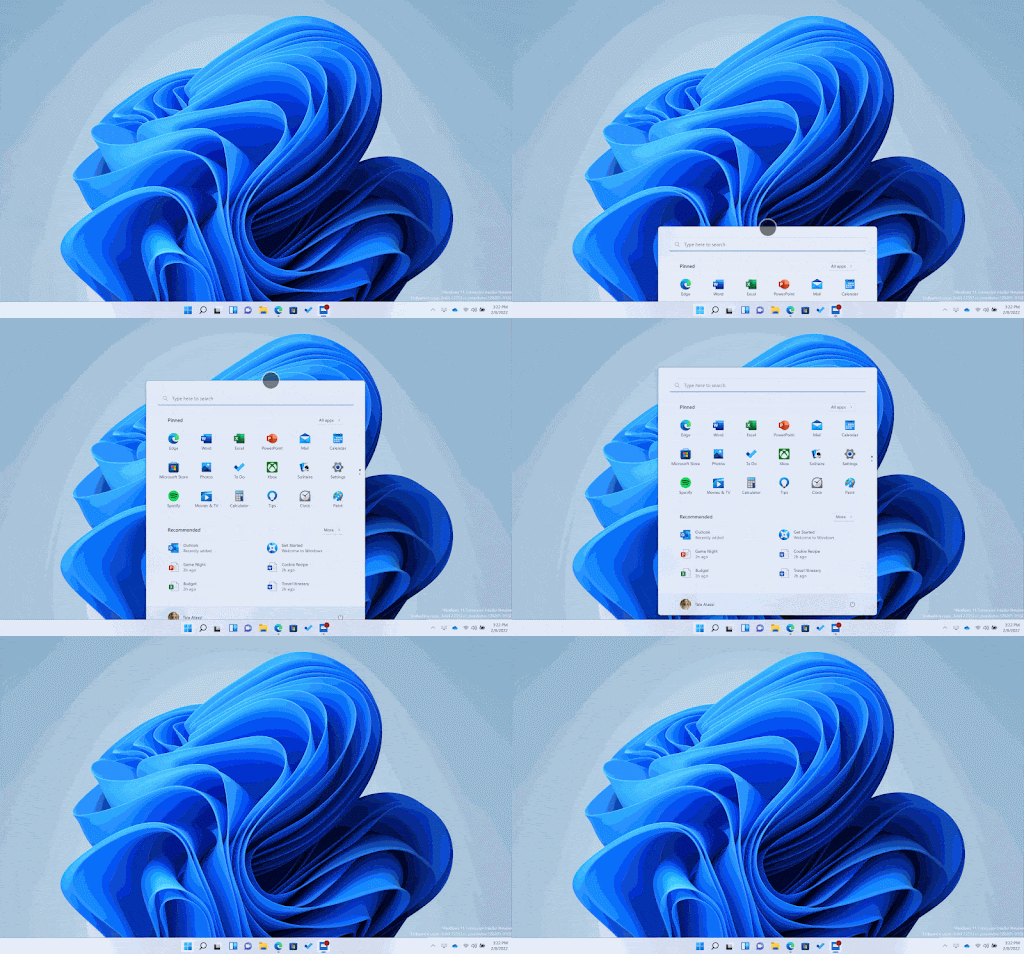
New touch gestures introduced in Windows 11 build 22557
Microsoft added the following 5 new gestures to the latest Windows 11 Dev Preview Build 22557:
- Swipe to invoke and dismiss Start
- Swipe between Pinned/All apps and Recommended/More on Start
- Swipe to invoke and dismiss Quick Settings
- Swipe to invoke and dismiss Notification Center
- Full-screen gripper
Swipe to invoke and dismiss Start
Swipe with your finger from the middle of the taskbar to invoke the Start menu and swipe back down to dismiss it.
Swipe between Pinned/All apps and Recommended/More on Start
Within Start, swipe right to left from Pinned to get to All apps and left to right to get back to Pinned. The same gesture works for Recommended/More.
Swipe to invoke and dismiss Quick Settings
Swipe with your finger from the bottom right of the taskbar to invoke Quick Settings and swipe back down to dismiss it.
Swipe to invoke and dismiss Notification Center
Microsoft updated the animation when swiping to invoke and dismiss Notification Center from the right edge of your screen so that it’s more responsive and follows your finger.
Full-screen gripper
In full-screen touch-oriented apps and games (e.g., Solitaire), notice a gripper that appears if you swipe from the edges of the screen. This feature is designed to keep you in your app if you accidentally swipe near the edges. If you need to access edge content, simply swipe again on the gripper.

