📢
Windows 11 Photos App Gets Major Update: New Features, Improvements, and Fixes
TECH NEWS DESK:
The Windows 11 Photos app has received an update for Insiders, including a new Slideshow Experience, Timeline Scrollbar, and Spot Fix feature.
-
Story published by Sunil Verma
Microsoft has announced a major update to the Photos app for Windows 11, bringing new features, improvements, and fixes based on feedback from users. The update includes a new Slideshow Experience, a Timeline Scrollbar, a Spot Fix feature, and more.
Windows 11 Photos App Update: Timeline Scrollbar, Spot Fix, and More
Windows 11 Photos App Update: Easier Photo Management and Editing Features for Insiders
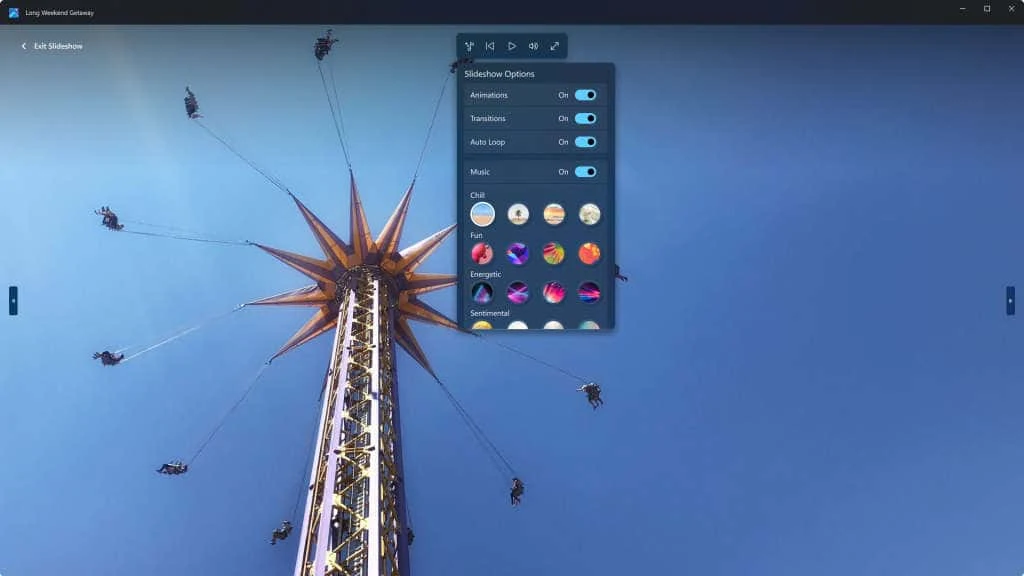
The Photos app in Windows 11 is a powerful tool for viewing, organizing, and sharing photos from your PC, OneDrive, and iCloud. The latest update introduces a new Slideshow Experience that lets you relive your memories with transitions, animations, and original music soundtracks. You can even choose multiple photos to watch together, making it perfect for showing off your latest vacation or family gathering.
Another highly requested feature is the Timeline Scrollbar, which groups photos by year and month, making it easy to find the photos you want. With the scrollbar, you can easily jump to any point in time and quickly locate specific photos.
The Spot Fix feature is another exciting addition that lets you remove blemishes or unwanted areas in your photo. This is a great tool for enhancing your photos and making them look their best.
In addition to these new features, the update also includes other fixes and improvements, such as Auto Enhance now being available without having to install the 93MB add-on. When importing photos from external devices, you can now drag and drop to choose the photos you want and use the quick toggle to confirm the files that have been selected. Hidden iCloud Photos will no longer display in the gallery, and audio on video files will now play by default, persisting user settings across videos.
Copying and pasting a photo from the Photos app into Outlook and Teams now inserts the image inline by default instead of adding an attachment. Multi-selecting photos is also easier than ever before, with the SHIFT key allowing for the selection of multiple consecutive photos in a row, while the CTRL key selects multiple non-consecutive photos.
To update your Photos app, simply ensure that you are on version number 2023.11050.2013.0 or higher, and the new features and fixes will automatically be available. As always, the Windows team encourages users to send feedback, so they can continue to make improvements to the Photos app that meet the needs of their users. With these latest enhancements, the Photos app is now even more powerful and user-friendly than ever before.
Sunil Verma is a Technology Evangelist and lead content creator of the site, where he delivers insightful coverage on the latest tech news and product launches. With a passion for breaking down complex digital trends, Sunil helps readers stay ahead of the curve in an ever-evolving technological landscape.
For productpromotion, connect him at sunilverma@kunal-chowdhury.com.