Windows File Recovery is a new command-line application from Microsoft, that helps you to recover files that you lost from your local storage and can't be restored from the Recycle Bin. It supports NTFS, FAT, exFAT, and ReFS file systems and can recover files from HDD, SSD, USB, and memory cards.
If you are running the latest version of Windows 10, you can use this tool to recover deleted files from your PC. Here's how to use the Windows File Recovery tool to recover lost files from your system.
There are many 3rd party applications available in the market which allows you to undelete files that you already lost from your hard drives or USB. We have already covered many of them in the past.
Now, what about a free tool from Microsoft? The all-new Windows File Recovery tool allows you to perform the same. All you need is to download the application from the Microsoft Store, some technical knowledge, and the knowledge of the commands to perform file recovery using this tool.
A point to note that the success of the recovery rate depends on how early you start the recovery process after the accidental deletion. Because, once that part of the disk sector overwritten by any other file, it becomes quite impossible to recover the file with any tool.
How to recover deleted files on Windows 10?
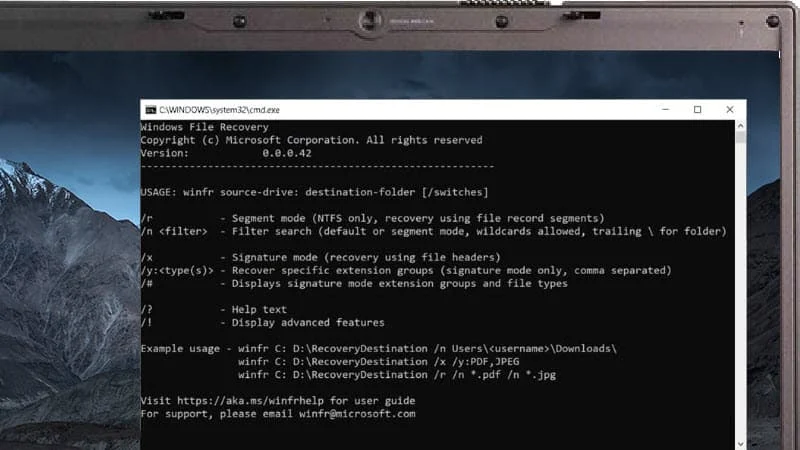
Once you have installed the Windows File Recovery tool, open the Console window (cmd) with admin privileges. Then you need to enter the following command with appropriate parameters and switches:
winfr source-drive: destination-folder: [/switches]

winfr: This is the command to run the Windows File Recovery tool.
source-drive: This is the drive from where the tool will recover the files.
destination-folder: This is the destination folder path where the recovered files will be saved.
[/switches]: These are the switches or modifiers that will tell the tool which files to recover.


