Microsoft recently rolled out Windows 11 Build 25211 to the Windows Insiders in the Dev Channel. The new build adds several new features like better customization options for Widgets, Task Manager options from the right-click context menu of the Windows 11 Taskbar, and an updated Snipping Tool with a nifty feature as detailed below.

- Windows 11 Build 25211 is now rolling out to the Windows Insiders in the Dev Channel.
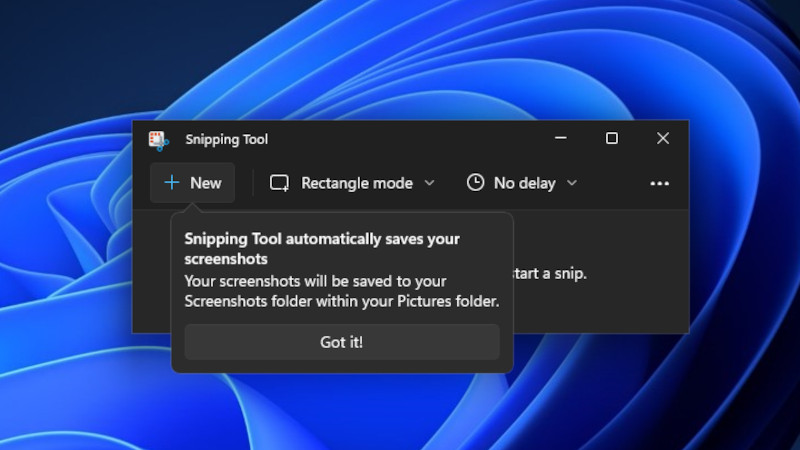
- In the latest build, Microsoft added an updated Snipping Tool that now includes the ability to automatically save your screenshots.
Windows 11 Dev (Preview) Build 25211 brings a new update to the Snipping Tool, bumping up the version to 11.2209.2.0. Prior to this build, you had to manually save a screenshot taken using Snipping Tool. Now, with the release of Snipping Tool version 11.2209.2.0, you can now automatically save a screenshot. In this version, Microsoft adds a new ability for that to the Snipping Tool.

Once you take a screenshot (WIN + SHIFT + S) with the new Snipping Tool, it will automatically save the captured image to the Pictures > Screenshots folder.
The feature came as the default behavior in Windows 11 Snipping Tool, but you can change the autosave feature back to the manual option by navigating to the Snipping Tool settings page.

It is also a point to be noted that Microsoft has separated the widget picker and Widgets settings in Windows 11 build 25211. The company has also added three new taskbar behaviors on the Widget settings page that you can toggle on or off.
Windows 11 users (currently limited to Windows Insiders in the Dev Channel) can now right-click on the Taskbar and launch the Task Manager from the context menu.
Apart from that, Windows Insiders who are also Office Insiders can now try the new Outlook for Windows. This will soon roll out to all Windows Insiders.