Do you know that, you can now access local files and folders in Silverlight 5? Yes, you heard right. Earlier to Silverlight 5 it was only limited to trusted location like My Documents folder, means it was only possible to read/write in My Documents. Now using Silverlight 5 you can do such operation in any files or folders.
Let's discuss more on this topic. After reading this post, you will be able to read/write to/from any file in local file system. Also you will be able to get information about System Resources. Read to know more.
Background
In Silverlight 4, it was possible to only access files and folders present inside a fully trusted folder like My Documents. You could use COM APIs from fully trusted OOB Silverlight applications. If you want to know more about this topic, read this post:
In Silverlight 5, you don't need any COM APIs. If your Silverlight application is a trusted out-of-Browser application, you can access any files or folders present inside your system very easily (as you do it in other applications like Win Form, WPF etc.). Let's discuss more on it with a small example.
Case Study
Let's take a case study. One of your client asked you to create a Silverlight application, which will run outside the browser window and read the hosts file present in the local system (i.e. c:\windows\system32\drivers\etc folder) and display it in the view.
To do this, you need to create an application using Silverlight 5. Set it as an Out-of-Browser application and mark it to run under "Elevated Trusted Application" from the project properties.
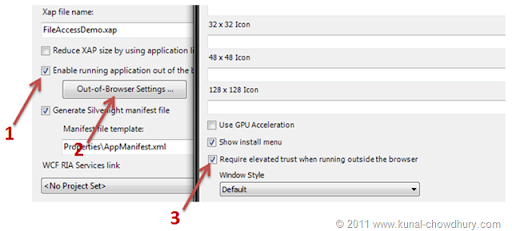
Once you setup your project properties, open the XAML file and add a button called "Read File" and attach a Click_Event to it. We will also add a ListBox, so that, we can display the text content inside it. Here is the code snippet of the same:
<UserControl x:Class="FileAccessDemo.MainPage"
xmlns="http://schemas.microsoft.com/winfx/2006/xaml/presentation"
xmlns:x="http://schemas.microsoft.com/winfx/2006/xaml">
<StackPanel x:Name="LayoutRoot" Background="White">
<Button Width="150" Height="26" Content="Read File" Click="Button_Click"/>
<ListBox x:Name="lstContent"/>
</StackPanel>
</UserControl>
Now we need to implement the Click event logic for the button. To do this, go to the code behind file and write your own logic to read any file present in your system. In our example, we will use the File class present under the System.IO namespace and read the hosts file. Then we will add the content in our ListBox.
Here is the code implementation:
private void Button_Click(object sender, RoutedEventArgs e)
{
string fileContent = File.ReadAllText(@"c:\windows\system32\drivers\etc\hosts");
lstContent.Items.Add(fileContent);
}
It's so simple. Just call the File.ReadAllText() method and pass the complete file path as the parameter. This will read the content and store it in a local variable called "fileContent". Now add the content to our ListBox.
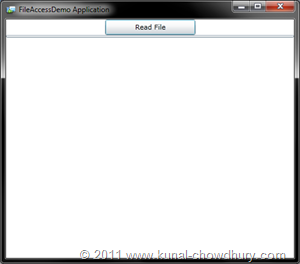
This is all about the code. If you run the application now (as OOB App), you will see the below Window in your screen:
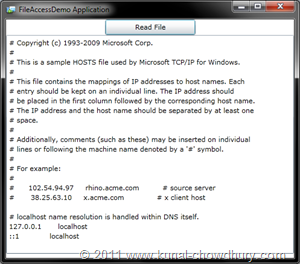
Now click the button called "Read File" and you will see the content of your hosts file as shown below (the content shown here will vary from system to system, but you will see the same content present in your file):
Hope, this feature will help you to do various operations on your system. There are many things available that you can explore for file system access. If I get some more time, will publish them for you to read. Till then ... Happy Coding.
That will be really helpful while working with files in Silverlight.
ReplyDeletemuch awaited feature. hope silverlight will catch up with most of the wpf features.
ReplyDeleteNice feature but can we access file informations inside browser Window? That will be great if Silverlight team implements it.
ReplyDeleteHI,
ReplyDeleteI am developing an application demo with win phone mango , but when I compile the following error: The target " GetCopyToOutputDirectoryContentProjectItems "does not exist in the project. already encountered this?
tks
renato.cantarino@gmail.com
Looks like, some files are missing in the project file. Make sure that, all files are present in your project and no warning icons are there for any of the files. Let me know.
ReplyDeleteHi,
ReplyDeleteI've have the same error: The target "GetCopyToOutputDirectoryContentProjectItems" does not exist in the project.
Anyone has a solution for this?
thanks
I am getting the same error. Just installed the windows phone 7.1 and tried to create a hello world as per their spec and got the error. Any ideas what is happening?
ReplyDeletethanks
Hi,
ReplyDeleteCan anyone of you upload that project file and share me the link so that, I can download and analyse it.
I am also getting the same error (The target "GetCopyToOutputDirectoryContentProjectItems" does not exist in the project). It started happening after I upgraded to 7.1. It's even happening for a new blank project (just created a new project, and ran it as is). I posted the question on the App Hub Forum (http://forums.create.msdn.com/forums/t/88359.aspx) but got nothing, no reply, other then other people with the same issue.
ReplyDeleteThanks.
Everyone of you (all Anonymous users) are getting the same error, but not giving enough details. None of you shared your project (after I mentioned it several times), then how can one help you to resolve your problem?
ReplyDeleteHow can we share a project please ? couldn't find a way to attach a file here.
ReplyDeleteYou can upload it in any file hosting site like SkyDrive or DropBox and share the link here.
ReplyDeleteI, too, am getting the same error (The target "GetCopyToOutputDirectoryContentProjectItems" does not exist in the project). I am getting it on the "Netflix Browser for Windows Phone 7" project from codeproject.com (http://www.codeproject.com/KB/windows-phone-7/NetflixBrowserII.aspx).
ReplyDeleteThis used to work until I upgraded to 7.1.
I've uploaded my version of "Netflix Browser" (targeting 7.1 and so forth) to SkyDrive (https://skydrive.live.com/#!/?cid=833cad2c87bb09e7&sc=documents&uc=1&id=833CAD2C87BB09E7%21422).
I, too, am getting the same error (The target "GetCopyToOutputDirectoryContentProjectItems" does not exist in the project). I am getting it on the "Netflix Browser for Windows Phone 7" project from codeproject.com (http://www.codeproject.com/KB/windows-phone-7/NetflixBrowserII.aspx).
ReplyDeleteThis used to work until I upgraded to 7.1.
I've uploaded my version of "Netflix Browser" (targeting 7.1 and so forth) to SkyDrive (https://skydrive.live.com/#!/?cid=833cad2c87bb09e7&sc=documents&uc=1&id=833CAD2C87BB09E7%21422).
I, too, am getting the same error (The target "GetCopyToOutputDirectoryContentProjectItems" does not exist in the project). I am getting it on the "Netflix Browser for Windows Phone 7" project from codeproject.com (http://www.codeproject.com/KB/windows-phone-7/NetflixBrowserII.aspx).
ReplyDeleteThis used to work until I upgraded to 7.1.
I've uploaded my version of "Netflix Browser" (targeting 7.1 and so forth) to SkyDrive (https://skydrive.live.com/#!/?cid=833cad2c87bb09e7&sc=documents&uc=1&id=833CAD2C87BB09E7%21422).
I, too, am getting the same error (The target "GetCopyToOutputDirectoryContentProjectItems" does not exist in the project). I am getting it on the "Netflix Browser for Windows Phone 7" project from codeproject.com.
ReplyDeleteThis used to work until I upgraded to 7.1.
Sorry for posting the same message multiple times. I didn't think my comments were posting correctly, but now I noticed the message "Your comment will be visible after approval."
ReplyDeleteI'm sharing the link for a project that is failing with the "GetCopyToOutputDirectoryContentProjectItems" error. In fact it's a blank project (just created a new project, and ran it as is).
ReplyDeleteThanks
https://skydrive.live.com/?cid=d22fc4483b217936&sc=documents&nl=1&uc=1&id=D22FC4483B217936%21110#
Thanks for sharing the Test App. I will check it tonight and will get back to you.
ReplyDeleteHi,
ReplyDeleteJust now I tested with the TestApp that you shared but sorry to say that I was unable to reproduce it here.
GetCopyToOutputDirectoryContentProjectItems error could be a directory security issue. Can you check whether it has proper permissions set to all files and directories? Also, can you give the root directory and it's subdirectories a ReadWrite permission?
Let me know after doing all these steps.
it's working now. I had to re-install the Windows Phone SDK 7.1 (Beta2).
ReplyDeleteGlad to know that, re-installing the SDK resolved your problem.
ReplyDeleteHi, I have to develop a Web Part in SharePoint 2010 which has to display all the Folders and Files. After reading your article i am planning to develop Silverlight XAP and use the XAP in the Silverlight Web Part.
ReplyDeleteMy doubt is, Using which credentials Silverlight will access the Files. Using Logged in User Account of System or Logged in User Account in SharePoint.
Could you please help me on this.
You need to set the elevated trust only in your application.
ReplyDeletegood, but what about in browser. with the elevated permissions it is supposed to work
ReplyDeleteHtmlPage.Window.Navigate(New Uri(c:\folder\my.pdf", UriKind.Absolute), "_blank")

